

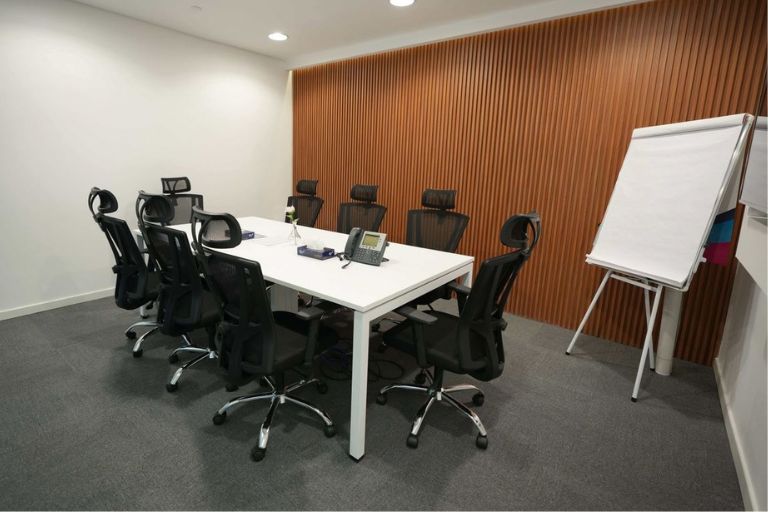
A productive meeting room is set up around five elements: the right furniture configuration for the types of meetings the room will host; a reliable AV and connectivity setup that works for both in-room and remote participants; a fully stocked supply station with whiteboard markers, notepads, pens, and presentation accessories; clear visual communication surfaces including a whiteboard or display screen and a noticeboard or glass panel for reference material; and a consistent room management system so the space is always clean, stocked, and ready.
The AHRI’s 2025 research on hybrid and flexible working in Australian workplaces found that 57% of Australian employers identify a feeling of disconnection between colleagues as the top disadvantage of hybrid working, with 38% citing staff collaboration as a key challenge. These figures are not surprising. When a team is split between the office and home on any given day, the moments they are physically together become the most important for building relationships, making decisions, and doing the work that benefits from real-time, face-to-face interaction.
ADP Research’s People at Work 2025 report found that only 16% of Australian employees reported being fully engaged at work, down from 18% the previous year, with in-office workers reporting higher engagement than hybrid or remote counterparts. At the same time, the Productivity Commission reported that Australia’s multifactor productivity declined 0.5% in 2024-25, falling below the 20-year average. These data points share a common thread: the quality of in-person collaboration matters more now than it did before hybrid work became the norm.
The meeting room is the primary venue for that collaboration. This article covers the five elements of a productive meeting room setup, the supplies every meeting room should have stocked, and how to maintain a meeting room so it is always ready when it is needed.
5 Elements of a Productive Meeting Room Setup
1. Furniture Configuration: Match the Layout to the Meeting Type
The furniture configuration of a meeting room determines what kinds of meetings it can support effectively. A long boardroom table with chairs down both sides is designed for formal, structured meetings with a clear presenter. A round table with no head position is designed for collaborative discussion among equals. A horseshoe configuration is designed for workshops and presentations where participants need to face both a screen and each other.
Before configuring a meeting room, identify the three or four meeting types that will happen in it most often. A room used primarily for client presentations needs a different configuration than one used primarily for team stand-ups or working sessions. In most small to medium offices, a single meeting room needs to be versatile enough to support multiple meeting types, which means the furniture should be reconfigurable rather than fixed.
Key furniture considerations for a productive meeting room include: a table sized appropriately for the room’s capacity without overcrowding; chairs with appropriate back support for the duration of typical meetings; power and data access points within reach of seated participants so devices can be used without extension cords across the floor; and enough clear wall space for a whiteboard and screen without being blocked by chairs or furniture.
2. AV and Connectivity: Non-Negotiable for Hybrid Teams
In an environment where 57% of Australian employers report disconnection between colleagues as a top hybrid work challenge, the AV and connectivity setup of a meeting room is not a nice-to-have. It is the infrastructure that determines whether a meeting with remote participants is productive or frustrating.
A functional AV setup for a hybrid meeting room requires at minimum: a display screen or monitor large enough for all in-room participants to see clearly; a camera that captures the whole room rather than just the presenter; a microphone system that picks up voices from all seats, not just those closest to a laptop; reliable Wi-Fi or a wired ethernet connection; and a clear, simple connection process that does not require five minutes of troubleshooting at the start of every meeting.
The accessories that support this setup are as important as the primary equipment. HDMI, USB-C, and DisplayPort cables in the right lengths, kept in a fixed location in the room, eliminate the time lost searching for the right cable when a meeting is about to start. A cable management system that keeps cables tidy and accessible without creating a clutter hazard on the table or floor completes the setup.
COS AV accessories: COS supplies HDMI, USB-C, and DisplayPort cables, adapters, cable management accessories, and presentation tools for meeting rooms. Your COS account manager can help configure the right accessory kit for your meeting room’s AV setup.
3. Meeting Room Supply Station: Everything a Meeting Needs Within Reach
A productive meeting room has everything a meeting needs within reach, without anyone having to leave the room to find it. This sounds straightforward and is consistently overlooked. The most common productivity loss in a meeting room is not a technical failure. It is the two minutes spent finding a whiteboard marker that works, or the five minutes finding a pen for someone who needs to take notes.
Every meeting room should have a designated supply station, either a small shelf, a drawer, or a caddy on the table or credenza, stocked with the following at all times:
- Whiteboard markers in at least four colours (black, blue, red, green) plus a fine-tip option; replaced before they dry out
- Whiteboard eraser and a small spray bottle of whiteboard cleaner
- Notepads at least one A4 or A5 notepad per chair capacity of the room
- Pens and pencils enough for every participant without needing to share
- Sticky notes in two sizes for group brainstorming and task-sorting activities
- Highlighters in two or three colours
- Presentation accessories a laser pointer or presentation clicker if the room has a screen
- A small first aid kit item such as headache tablets, for longer meetings
The supply station should be checked and restocked after every meeting or at a minimum at the start of each day. Assign responsibility clearly: if nobody owns the meeting room supply check, it will not happen consistently.
COS meeting room supplies: COS supplies whiteboard markers, notepads, pens, sticky notes, highlighters, and presentation accessories. A standing order for meeting room supplies ensures the room is always stocked without anyone having to remember to reorder.
4. Visual Communication Surfaces: Give Ideas Somewhere to Go
The research consistently shows that the most productive meetings are ones where participants are actively engaged rather than passively receiving information. Visual communication surfaces, whiteboards, glass panels, pin boards, and display screens, create the conditions for active participation by giving ideas somewhere to go in real time.
A whiteboard is the most versatile visual surface in any meeting room. It supports live note-taking, diagram drawing, process mapping, decision tracking, and any other activity that benefits from a shared visual reference. For a meeting room used by multiple teams across the day, a magnetic whiteboard allows notes and diagrams to be photographed and cleared between meetings, maintaining a clean slate for each session.
A secondary noticeboard or pinboard adjacent to the whiteboard is useful for displaying reference material, project timelines, or standing agenda items that teams return to across multiple sessions. For rooms used by a single team, this surface can carry standing context that does not need to be re-established at the start of every meeting.
Whiteboard placement: Position the whiteboard so it is visible from every seat in the room without requiring participants to turn significantly from their natural forward-facing position. A whiteboard that can only be seen by half the room at any given time will not be used consistently.
5. Room Management: Keep It Clean, Stocked, and Ready
A meeting room that requires preparation before every meeting is a meeting room that will be used reluctantly. The highest-performing meeting rooms are the ones that are always clean, always stocked, and always technically functional, so that the first person who walks in can start their meeting without any setup time.
Room management requires three things: a cleaning schedule that covers the meeting room daily, including table surfaces, chairs, the whiteboard, and the AV equipment; a supply check that confirms the supply station is fully stocked before the first meeting of the day; and a technical check that confirms the screen, camera, microphone, and connection cables are all working.
For offices with multiple meeting rooms, a room management checklist posted inside the door makes the standard visible and the responsibility clear. For smaller offices with a single meeting room, a brief daily check by whoever opens the office is sufficient. The key is consistency: a meeting room that is reliably ready creates a different culture around meetings than one that requires recovery time at the start of each session.
Meeting Room Setup Checklist
Use this checklist when setting up a new meeting room or auditing an existing one.
Configuration and comfort
Table sized appropriately for room capacity; reconfigurable chairs with back support; power and data within reach of all seats; clear sightlines to whiteboard and screen from every seat.
Display, audio, and connectivity
Screen or monitor sized for the room; room camera and microphone covering all seats; reliable Wi-Fi or wired ethernet; HDMI, USB-C, and DisplayPort cables in fixed accessible location; cable management in place.
Stocked and assigned
Whiteboard markers (four colours plus fine-tip); eraser and cleaner; notepads and pens for room capacity; sticky notes; highlighters; presentation clicker or laser pointer if applicable. Responsibility for daily restock assigned.
Whiteboard and noticeboard
Whiteboard visible from every seat; whiteboard surface clean and markers functional; secondary noticeboard or pinboard for reference material in place if applicable.
Daily check routine
Cleaning schedule covering table, chairs, whiteboard, and AV equipment; supply check before first meeting of the day; technical check confirming screen, camera, mic, and cables functional.
Frequently Asked Questions
How do you set up a productive meeting room?
A productive meeting room is set up around five elements: furniture configured for the types of meetings the room will host; a reliable AV and connectivity setup for both in-room and remote participants; a fully stocked supply station with whiteboard markers, notepads, pens, and presentation accessories; visual communication surfaces including a whiteboard and noticeboard; and a consistent room management routine that keeps the space clean, stocked, and technically ready before every meeting.
What supplies does every meeting room need?
Every meeting room should have as a minimum: whiteboard markers in at least four colours with a fine-tip option, a whiteboard eraser and cleaner, notepads and pens for every participant at room capacity, sticky notes in two sizes, highlighters in two or three colours, and a presentation clicker or laser pointer if the room has a screen. These should be stored in a designated supply station and restocked daily or after every meeting.
Why is meeting room setup important for hybrid teams?
When a team is partially distributed, the moments they are physically together in a meeting room become the most important for relationship-building, decision-making, and collaborative work. A meeting room that is poorly set up, with unreliable AV, missing supplies, or inadequate visual surfaces, undermines those moments and amplifies the disconnection hybrid arrangements can create.
What AV equipment does a meeting room need for hybrid meetings?
At minimum, a hybrid meeting room needs: a display screen or monitor large enough for all in-room participants to see clearly; a camera that captures the whole room; a microphone system that picks up voices from all seats; reliable internet connectivity; and the right cables in the right place, including HDMI, USB-C, and DisplayPort options. Cable management that keeps these accessible without clutter is as important as the equipment itself.
How often should meeting room supplies be restocked?
Dedicated account management is the quality that most directly determines whether a supplier relationship works well in practicaHow often should meeting room supplies be restocked?e. A named account manager who knows the business, monitors availability, manages standing orders, and resolves issues proactively transforms the supplier relationship from one that requires active management into one that runs in the background. For SMEs whose owners already manage every operational function, this distinction has a direct impact on how much time goes to supply administration each month.
Can COS supply everything a meeting room needs?
Yes. COS supplies whiteboard markers and erasers, notepads, pens, sticky notes, highlighters, presentation accessories, AV cables and adapters, cable management accessories, and cleaning products for meeting room surfaces. COS is one of three suppliers on the Australian Government’s Whole of Government Stationery and Office Supplies Panel (Department of Finance, December 2024). A standing order through your COS business account ensures meeting room supplies are replenished automatically without manual reordering.
COS supplies whiteboard markers, notepads, pens, AV cables, presentation accessories, and cleaning products for meeting rooms across Australia. One business account, standing orders, next-day delivery.