


A reliable computer network does more than connect devices. It keeps teams productive, protects business information, supports cloud tools, and gives every workplace the digital foundation it needs to operate with confidence. From emails and video calls to file sharing, printing, point of sale systems, warehouse scanners, and hybrid work, almost every daily task depends on network performance.
For Australian organisations, the stakes are getting higher. The Australian Bureau of Statistics reported that in 2024–25, 24% of businesses offered staff the ability to work from home, while 12% reported using artificial intelligence, up from 1% in 2022–23. Both trends rely on dependable connectivity, secure access, and the right technology setup.
Here is what computer networking is, how it works, and what businesses should consider when building or improving their setup.
What Is Computer Networking?
Computer networking is the practice of connecting computers, devices, servers, and applications so they can share information and resources. In a workplace, that might include laptops, desktops, printers, phones, tablets, wireless access points, security cameras, cloud platforms, and shared storage.
At its simplest, a network lets devices talk to each other. At its best, it creates a fast, secure, and well organised digital environment where people can access what they need without friction. That is why computer networking is not only an IT concern. It affects productivity, customer service, cybersecurity, business continuity, and the employee experience.
How Computer Networking Works
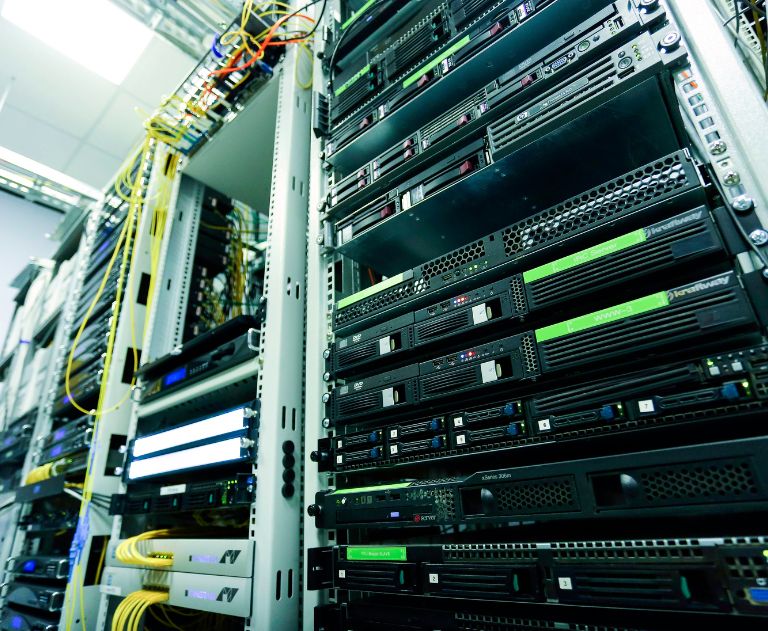
Every network is built from a mix of hardware, software, and rules. Devices connect through wired or wireless pathways. Routers direct traffic between networks and the internet. Switches connect devices within a local network. Modems provide the link to an internet service provider. Wireless access points extend Wi-Fi coverage. Cables, adapters, and power accessories keep the physical setup stable.
The right supporting equipment matters. Reliable cables and power accessories, including Cat6 Ethernet cables, help maintain fast and consistent connections across workstations, meeting rooms, and shared office spaces.
Behind the scenes, network protocols set the rules for how data is packaged, addressed, transmitted, and received. These rules make it possible for different devices and systems to work together, even when they come from different manufacturers.
LAN, WAN, Wi-Fi and Other Network Types
Most business networks fall into a few common categories. A Local Area Network, or LAN, connects devices within a limited area, such as an office, school, warehouse, or retail store. A LAN is typically fast, private, and controlled by the organisation. It is what allows staff to print to a shared device, access internal systems, or connect to local servers.
A Wide Area Network, or WAN, connects multiple locations across larger distances. A company with offices in Sydney, Melbourne, and Brisbane may use a WAN so teams can access shared systems and communicate securely across sites. The key difference between LAN and WAN is scale. A LAN serves one local environment, while a WAN links multiple locations or networks together.
Wi-Fi is a wireless way to access a LAN. It is convenient for laptops, tablets, phones, and flexible workspaces, but it still depends on the underlying network being well designed. Wired connections, often using Ethernet cables, remain valuable for equipment that needs maximum reliability, such as desktop workstations, servers, network printers, video conferencing systems, and payment devices.
Why Computer Networking Matters for Business
A good network is often invisible. People only notice it when the video call freezes, the shared drive will not load, the printer drops out, or a cloud application slows down. But when it works well, it supports almost every part of the business.
Digital inclusion research shows why dependable connectivity matters beyond the IT team. The Australian Digital Inclusion Index found that national access improved in 2025, rising 4.8 points to 76.8, while around one in five Australians remained excluded or highly excluded from digital participation. For employers, that reinforces the importance of accessible, reliable systems that help staff connect to work tools wherever they are.
Strong networking also helps businesses scale. New users, devices, cloud platforms, and locations can be added more easily when the network has been planned properly. Poorly planned networks tend to grow in fragments, with temporary fixes becoming permanent risks.
The Security Side of Computer Networking
Computer networking and cybersecurity are closely linked. Every connection is a possible pathway for legitimate work or unwanted access. That makes network security one of the most important parts of any setup.
The Australian Signals Directorate’s Annual Cyber Threat Report 2023–24 found that more than 87,400 cybercrime reports were made in the financial year, equal to one report every six minutes. For businesses, the average self-reported cost of cybercrime was $49,600 for small businesses, $62,800 for medium businesses, and $63,600 for large businesses. Business email compromise alone accounted for almost $84 million in self-reported losses.
Good network security starts with practical controls: strong passwords or passphrases, multi-factor authentication, regular software updates, backups, restricted access, secure Wi-Fi settings, and clear processes for onboarding and removing users. For physical security, simple tools such as privacy, locks and security accessories can support broader workplace device protection.
Key Components of a Business Network
Most workplace networks include a few essential parts. Routers connect the local network to the internet and manage traffic between networks. Switches connect wired devices inside the workplace. Wireless access points provide Wi-Fi coverage. Firewalls monitor and control incoming and outgoing traffic. Servers or cloud services store and deliver data. Endpoints, such as laptops and desktops, are the devices people use every day.
Peripherals matter too. A reliable monitor, keyboard, mouse, headset, webcam, and docking station can make the networked workplace easier to use. The best network in the world will still feel frustrating if the equipment around it slows people down. That is why networking should be considered alongside the broader technology environment, from docks, hubs and adapters to webcams and conferencing equipment.
Common Networking Challenges
Slow speeds are the most visible networking problem, but they are rarely the only issue. Dropouts, weak Wi-Fi coverage, overloaded routers, outdated cabling, unsecured guest access, inconsistent device policies, and poor documentation can all create ongoing frustration.
Hybrid work has made these challenges more complex. Staff may be connecting from home networks, shared workspaces, customer sites, or mobile hotspots. This means businesses need to think about secure remote access, endpoint protection, cloud performance, and whether employees have the right equipment to work effectively outside the office.
A useful rule is to review the network whenever the way people work changes. New office layouts, more video conferencing, additional cloud tools, larger files, more connected devices, or a shift to flexible work can all place new pressure on the system.
How to Build a Better Network
Start with the basics. Map the number of users, devices, rooms, applications, and locations the network must support. Identify which tasks need the most bandwidth, such as video meetings, cloud backups, design files, large data transfers, or warehouse systems. Then review the physical environment, including cabling, power points, walls, meeting rooms, storage areas, and shared spaces.
Plan for growth rather than only solving today’s problems. Choose equipment that can support more devices, stronger security settings, and future cloud use. Keep a simple record of key details, including network names, equipment locations, warranty information, administrator access, and support contacts.
Finally, make maintenance routine. Update firmware, replace damaged cables, check backup processes, remove unused accounts, review access permissions, and test recovery plans. A network is not a set and forget asset. It is part of the workplace infrastructure and should be managed with the same care as furniture, safety equipment, and essential supplies.
The Bottom Line
Computer networking is the foundation that keeps modern workplaces connected, secure, and productive. A well-designed network helps people share information, use cloud systems, collaborate across locations, and work with fewer interruptions. A poorly maintained one can quietly slow everything down.
For businesses, the goal is not to make networking complicated. It is to make it dependable. Understand the differences between LAN and WAN, choose the right mix of wired and wireless connections, protect every access point, and support the network with quality equipment. Do that well, and the technology fades into the background, exactly where it should be.